
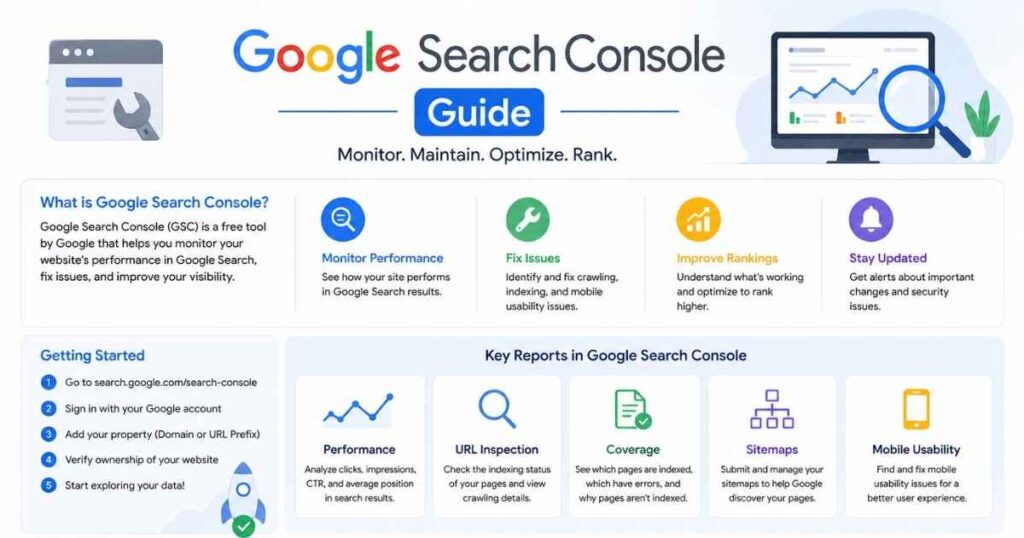
Google Search Console guide is one of the most useful resources for any small business owner in Holland, MI who wants more visibility in Google search. It helps you understand how your website performs, spot technical SEO issues, and find opportunities to improve traffic and leads.
Introduction – Google Search Console guide
Google Search Console, often called GSC, is a free tool from Google that shows how your site appears in search results. It gives you real data on clicks, impressions, indexing, and page health, which makes it essential for SEO decisions.
For business owners in Holland, MI, this matters because SEO is not just about ranking. It is about understanding what people search for, how they find your site, and what may be stopping your pages from appearing more often in Google.
What is Google Search Console?
Google Search Console is a website monitoring and reporting platform from Google that helps you see and improve your search presence. It does not directly increase rankings by itself, but it gives you the data needed to make smarter SEO improvements.
It shows whether Google can crawl and index your pages, which pages are getting traffic, and which search queries are bringing people to your site. For a local service business, that could mean finding out whether people are discovering your pages for terms like “plumber near me,” “best bakery in town,” or “SEO services for small business.”
Why Google Search Console Is Important for SEO
A strong google search console for seo strategy starts with data, not guesswork. GSC tells you which pages are performing, which keywords are getting impressions, and where your site may be losing clicks because of weak titles or low visibility.
It also helps with technical SEO. If a page is not indexed, blocked, or returning errors, Search Console makes that problem visible so you can fix it faster. That is especially valuable for small businesses that cannot afford to waste time publishing pages that never get discovered.
How to Set Up Google Search Console
A simple google search console tutorial starts with setting up your property correctly. Google allows two main setup options: Domain Property and URL Prefix Property, and each serves a different purpose.
- Sign in with your Google account.
- Add your website URL or domain.
- Choose the property type.
- Verify ownership using one of the available methods.
- Submit your sitemap after verification.
For most businesses, Domain Property is the better long-term choice because it covers all versions of the domain, including subdomains and protocol variations. If you manage only one specific version of a site, URL Prefix can still work, but it is more limited.
How to Use Google Search Console
Once your site is verified, the real value begins. Knowing how to use google search console well means checking the right reports regularly and acting on the insights, not just logging in once in a while.
Performance Report
The Performance report shows clicks, impressions, average position, and click-through rate. This is the best place to see what search terms people use to find your website.
A useful example for a local service business: if your page has high impressions but low clicks, your title tag or meta description may not be convincing enough. Improving CTR here can deliver more traffic without publishing a new page.
URL Inspection Tool
The URL Inspection Tool helps you check whether a specific page is indexed and how Google sees it. This is useful when you publish a new blog post, update a service page, or want to confirm that a fix has worked.
If Google has not indexed an important page, inspect the URL, check for issues, and request indexing after the problem is resolved. That can save a page from sitting invisible for weeks.
Indexing and Coverage
Indexing is one of the most important parts of google search console for seo. The indexing or pages report shows whether Google has indexed your pages successfully or found errors such as 404s, redirects, noindex tags, or server problems.
For example, if your service page is marked “noindex,” Google will not show it in search results unless that tag is removed. If your page returns server errors, Google may have trouble crawling it at all.
Sitemaps
A sitemap helps Google discover your important pages faster. After submitting your sitemap in Search Console, Google can better understand the structure of your website and find new content more efficiently.
This is especially useful for sites with many pages, like agencies, contractors, clinics, or multi-location local businesses. If you publish new service pages or location pages often, keeping your sitemap updated is a smart habit.
Core Web Vitals
Core Web Vitals measure user experience signals such as loading speed, interactivity, and visual stability. While Search Console does not replace a full site speed audit, it helps you identify pages that may need performance improvements.
For small businesses, this matters because users often leave slow pages before they contact you. A fast, stable site usually supports both rankings and conversions.
Tracking Rankings and Fixing Errors
A practical google search console tutorial is not complete without tracking progress over time. Use the Performance report to compare date ranges, identify pages gaining or losing clicks, and see which queries deserve better optimization.
If a page is slipping, check whether the title is outdated, the content is thin, or the page is competing with another page on your site. If a page is not indexed, inspect the URL, review the issue, fix it, and then validate the fix in Search Console.
For local businesses in Holland, MI, this can be very effective. A roofing company might notice that its “roof repair” page gets impressions but few clicks, which may signal the need for a stronger title like “Emergency Roof Repair in Holland, MI | Fast Local Service.”
Common Mistakes to Avoid
Many beginners make the same mistakes when using Search Console. They check it too rarely, ignore indexing warnings, or focus only on rankings instead of actual search performance.
Avoid these common problems:
- Not submitting a sitemap.
- Leaving important pages set to noindex.
- Ignoring 404 errors and redirect issues.
- Forgetting to review queries with high impressions and low CTR.
- Comparing only one short time period instead of trends over time.
The biggest mistake is treating Search Console as a passive dashboard. It works best when you use it as an action tool.
Expert SEO Insights
To get more from Search Console, focus on pages that already have visibility but still need improvement. Pages ranking on page two or with high impressions and low CTR are often the fastest wins because they already have search demand.
Small changes can make a big difference. Updating titles, improving meta descriptions, adding clear headings, and strengthening internal links can help pages earn more clicks and become more useful to visitors.
It also helps to connect GSC insights with your content strategy. If you see a query bringing impressions that is only loosely related to the page, create a stronger dedicated page or expand the existing content to match the search intent more closely.
How Businesses Can Use It
Businesses can use GSC to generate more traffic and leads by turning search data into specific page improvements. A local service business might discover that users search for service plus city names, while a startup may learn which blog topics bring the most qualified visitors.
Here is a simple example:
- A dental clinic sees impressions for “teeth whitening cost.”
- The current page ranks but gets few clicks.
- The clinic updates the title, adds a clearer service explanation, and links to the booking page.
- Result: better CTR and more appointment inquiries.
That is the real business value of Search Console. It helps you improve pages based on what actual users search for, not assumptions.
Internal Linking Strategy
If you are publishing this on EchoWings Media’s website, this blog should naturally support internal links to service pages. Add contextual links to your SEO services page, website audit page, and digital marketing services page where relevant.
Good link placements include:
- A mention of fixing technical issues can link to your website audit service.
- A paragraph about improving rankings can link to SEO services.
- A section on traffic and leads can link to digital marketing support.
This not only helps readers explore your services but also strengthens topical relevance across the site.
FAQ
1. What is Google Search Console used for?
A. It is used to monitor how your site appears in Google search, track traffic, check indexing, and identify SEO issues.
2. Is Google Search Console free?
A. Yes, Search Console is a free Google tool for website owners and SEO teams.
3. How often should I check it?
A. For most small businesses, checking it weekly is a good habit. If you publish content regularly or are fixing technical issues, check it more often.
4. Why is my page not indexed?
A. Common reasons include noindex tags, crawl issues, server errors, or poor page accessibility.
5. Can Search Console improve rankings directly?
A. Not directly, but it gives you the data needed to make SEO changes that can improve rankings over time.
6. What should I do if a page has high impressions but low clicks?
A. Improve the title tag, meta description, and search intent match so the page becomes more appealing in results.
7. Do I need a sitemap?
A. Yes, submitting a sitemap helps Google find and understand your pages more efficiently.
Conclusion
A well-used Google Search Console guide gives small businesses in Holland, MI a clear advantage because it turns raw search data into action. When you know what users search for, which pages Google can index, and where your site is losing clicks, you can improve SEO with far more confidence.
For businesses that want stronger rankings, better technical SEO, and more qualified leads, EchoWings Media can help turn Search Console insights into measurable growth. Contact EchoWings Media to improve your website performance, fix SEO issues, and build a smarter search strategy.